Command Line Reference
Calling any Python function from the shell
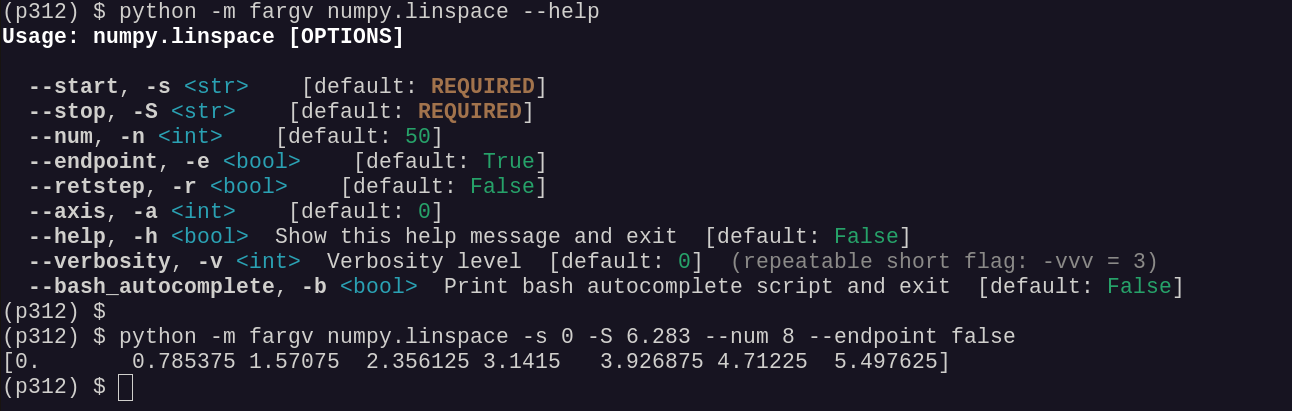
python -m fargv <module.callable> invokes any importable Python callable
directly from the shell. Parameter types and defaults are inferred from the
function’s signature — no wrapper code needed.
python -m fargv numpy.linspace --help
python -m fargv numpy.linspace -s 0 -S 6.283 --num 8 --endpoint false
fargv.parse — built-in flags
Every script that uses fargv.parse automatically receives the following
parameters (all can be individually disabled with auto_define_*=False):
--help / -h
Print a formatted help message and exit.
python myscript.py --help
--bash_autocomplete
Print a bash completion script and exit.
source <(python myscript.py --bash_autocomplete)
--verbosity / -v (count switch)
Set the verbosity level. Can be specified as a count switch (-vvv = 3)
or explicitly (--verbosity=2).
python myscript.py -vvv        # verbosity = 3
python myscript.py --verbosity=2
--config
Path to a JSON config file. Values in the file override coded defaults but are themselves overridden by any CLI flags that follow.
python myscript.py --config=~/.myapp.config.json
The default config path is ~/.{appname}.config.json (derived from the
program name automatically).
--auto_configure
Print the current parameter values (after applying config file and CLI flags) as pretty-printed JSON, then exit. Useful for generating a config file template:
python myscript.py --auto_configure > ~/.myapp.config.json
Disabling built-in parameters
Pass False for any auto_define_* argument to fargv.parse:
p, _ = fargv.parse(
    {"n": 1},
    auto_define_help=False,
    auto_define_bash_autocomplete=False,
    auto_define_verbosity=False,
    auto_define_config=False,
)
Legacy API built-in flags
Scripts that still use fargv.fargv (single-dash syntax) get a smaller set
of built-in parameters. See Legacy API Reference for
details.
Flag |
Alias |
Description |
|---|---|---|
|
|
Print help and exit |
|
— |
Print bash completion script and exit |
|
— |
Set verbosity level (integer) |