Quickstart
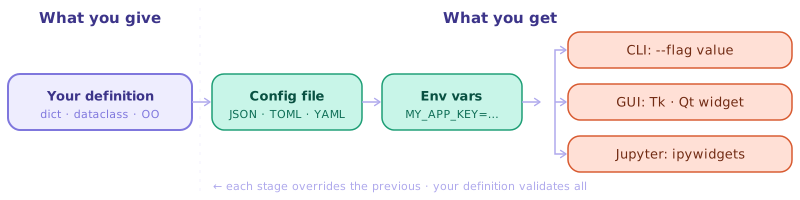
Define your parameters once; fargv builds the full stack — config file, environment variable overrides, and CLI / GUI / Jupyter interface — automatically.
Installation
pip install fargv
Four ways to define parameters
fargv supports four definition styles. All use --name=value (double-dash)
syntax and produce the same auto-generated --help, bash completion, config
file, and env-var overrides.
Style |
Best for |
|---|---|
scripts, notebooks, rapid prototypes |
|
descriptions, rich types, mandatory params |
|
typed config, IDE autocompletion, larger projects |
|
exposing existing callables as CLI tools |
Plain dict
Pass a dict of default values — fargv infers types from the Python type of each default:
import fargv

p, _ = fargv.parse({
    "name":    "world",
    "count":   1,
    "verbose": False,
    "mode":    ("fast", "slow", "medium"),   # choice; first element is default
    "files":   [],                           # variadic list (extra CLI tokens)
})
print(f"Hello, {p.name}! count={p.count}")
python myscript.py --name=Alice --count=3 --verbose --mode=slow a.txt b.txt
String parameters support {key} cross-references:
p, _ = fargv.parse({
    "base": "/tmp",
    "out":  "{base}/results",   # resolved to /tmp/results at parse time
})
# --base=/data  →  p.out == "/data/results"
Two-element tuple pitfall — a
tuplewhose second element is astris treated as(default, "description")for--help, not as a two-item choice. Use three or more elements for a binary choice, e.g.("yes", "no", "auto"), or pass an explicitFargvChoice.
Dict with Fargv* types
Replace bare literals with Fargv* parameter objects for descriptions,
mandatory values, and rich types. Plain literals and Fargv* objects can be
mixed freely in one dict.
import sys, fargv

p, _ = fargv.parse({
    "weights": fargv.FargvStr(fargv.REQUIRED,
                   description="Path to pretrained weights (mandatory)"),
    "epochs":  fargv.FargvInt(100,
                   description="Total training epochs"),
    "lr":      fargv.FargvFloat(0.01),
    "arch":    fargv.FargvChoice(["resnet50", "vit_b16", "efficientnet"],
                   description="Model architecture"),
    "img_size":fargv.FargvTuple((int, int), default=(640, 640),
                   description="Input resolution (width height)"),
    "log":     fargv.FargvStream(sys.stderr,
                   description="Log destination (file path, stderr, or stdout)"),
    "verbose": fargv.FargvInt(0, short_name="v", is_count_switch=True),
    "ckpts":   fargv.FargvPositional(default=[],
                   description="Extra checkpoint files to evaluate"),
})
print(f"Training {p.arch}  weights={p.weights}  img_size={p.img_size}")
python train.py --weights=model.pt --lr=1e-4 --img_size="(1280,1280)" -vv a.pt b.pt
Dataclass
Pass a @dataclass class (not an instance) — the return value is an
instance of your class, so every IDE autocompletes cfg.lr, cfg.arch, etc.
from dataclasses import dataclass
import fargv

@dataclass
class Config:
    data_root:  str   = "/datasets/imagenet"
    arch:       str   = "resnet50"
    "Model architecture identifier."    # bare string literal → shown in --help
    epochs:     int   = 90
    lr:         float = 0.1
    amp:        bool  = False

cfg, _ = fargv.parse(Config)
print(f"Training {cfg.arch} for {cfg.epochs} epochs")   # cfg.arch autocompletes
python train.py --arch=vit_b16 --epochs=30 --amp
Mandatory fields — omit the default:
@dataclass
class InferConfig:
    checkpoint: str           # no default → mandatory on the CLI
    threshold:  float = 0.5
Function signature
Pass any callable — fargv introspects its type-annotated signature and uses
the docstring in --help:
import fargv

def train(
    corpus:    str,
    tokeniser: str  = "wordpiece",
    vocab:     int  = 30_000,
    lower:     bool = True,
) -> None:
    """Tokenise *corpus* and save the resulting vocabulary."""
    print(f"tokenising {corpus!r}  vocab={vocab}  lower={lower}")

p, _ = fargv.parse(train)
train(**vars(p))
python tok.py --corpus=/data/wiki.txt --vocab=50000
Use parse_and_launch to parse and call in one step:
fargv.parse_and_launch(train)
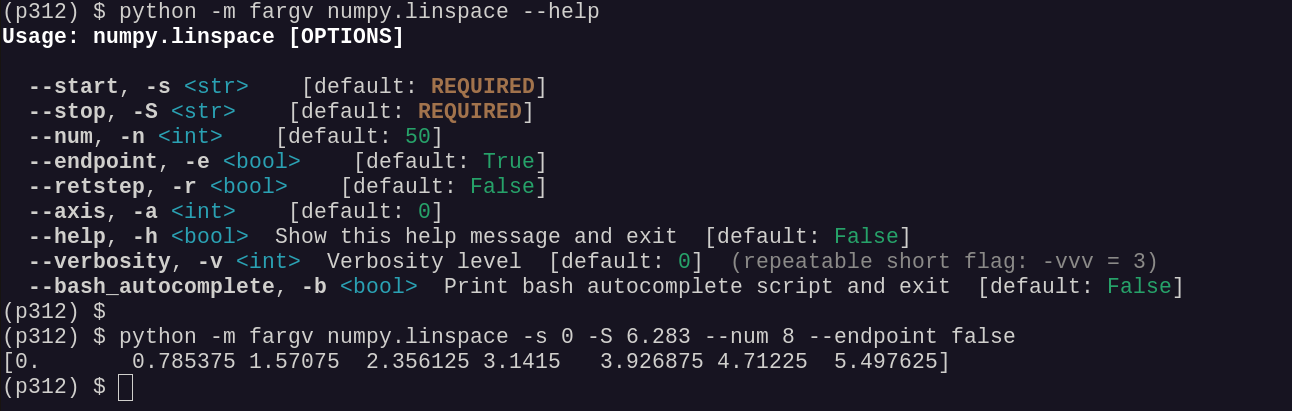
Or invoke any importable callable without writing a script at all:
python -m fargv numpy.linspace --start=0 --stop=6.283 --num=8
Parameter types (quick reference)
Default / class |
CLI example |
|---|---|
|
|
|
|
|
|
|
|
|
|
|
|
|
|
|
|
|
|
|
|
|
|
|
|
See parameter_types.md for the full reference.
Built-in flags
Every script gets these automatically (all can be disabled individually):
Flag |
Alias |
Description |
|---|---|---|
|
|
Print help and exit |
|
— |
Print bash completion script and exit |
|
|
Verbosity level ( |
|
— |
Load a JSON / YAML / TOML / INI config file |
Subcommands
A nested dict whose values are dicts is automatically a subcommand tree:
p, _ = fargv.parse({
    "shared_flag": True,
    "cmd": {
        "train": {"lr": 0.01, "epochs": 10},
        "eval":  {"dataset": "val"},
    },
})
# python prog.py train --lr=0.5 --shared_flag false
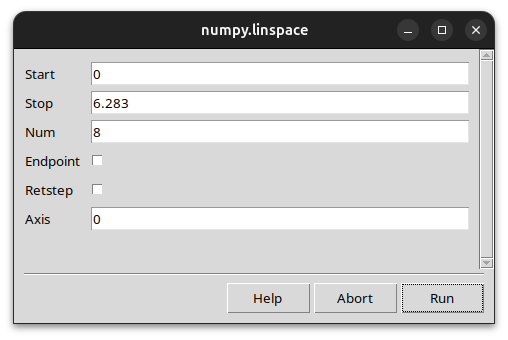
GUI backends
python train.py --user_interface=tk    # Tk dialog
python train.py --user_interface=qt    # Qt/PySide dialog
Legacy API (backwards compatibility)
Scripts written with fargv.fargv(...) (single-dash -name=value syntax)
continue to work unchanged. New scripts should use fargv.parse.
# Single-dash legacy style — supported for backwards compatibility
p, _ = fargv.fargv({"name": "world", "count": 1, "verbose": False})
# python script.py -name=Alice -count=3 -verbose
See Legacy API reference for full details.
For the complete definition-style guide — including pros/cons, common mistakes, and worked examples — see defining_parsers.md.