fargv Features
This page documents each unique fargv feature with a runnable example, an explanation, and (where applicable) instructions for enabling or disabling it. At the bottom, a comparison table shows how these features stack up against popular alternatives.
Type inference from Python literals
fargv maps plain Python values to CLI parameter types automatically — no decorators, no annotations, no schema classes required.
import fargv

p, _ = fargv.parse({
    "name":    "world",          # → str
    "count":   1,                # → int
    "lr":      0.001,            # → float
    "verbose": False,            # → bool flag
    "mode":    ("fast", "slow", "medium"),  # → choice (first = default)
    "files":   [],               # → variadic list
})
$ python script.py --help

Help for script

Usage: script [OPTIONS]

  --name, -n <str>      [default: 'world']
  --count, -c <int>     [default: 1]
  --lr, -l <float>      [default: 0.001]
  --verbose, -v <bool>  [default: False]  (switch: --flag sets True)
  --mode, -m <str>      [default: 'fast']  choices: ['fast', 'slow', 'medium']
  --files, -f <list>    [default: []]
Type inference table
Default value |
Inferred type |
CLI syntax |
|---|---|---|
|
|
|
|
|
|
|
|
|
|
|
|
|
|
|
|
any + description |
— |
|
|
trailing tokens |
|
|
|
Disable: not applicable — type inference is the definition mechanism. Replace any literal with an explicit
Fargv*object to override it.
Four definition styles
fargv accepts four distinct forms of parser definition, each suited to a
different development context. All styles produce the same CLI interface and
return (namespace, help_str).
Style |
Returns |
Best for |
|---|---|---|
Plain dict |
|
prototypes, notebooks |
Dict with |
|
production scripts needing descriptions |
Dataclass |
dataclass instance |
typed configs, IDE autocompletion |
Function signature |
|
exposing existing callables |
# Style 1 — plain dict
p, _ = fargv.parse({"lr": 0.01, "epochs": 10})

# Style 2 — dict with Fargv* types
p, _ = fargv.parse({"lr": fargv.FargvFloat(0.01, description="Learning rate")})

# Style 3 — dataclass
from dataclasses import dataclass
@dataclass
class Cfg:
    lr: float = 0.01
    epochs: int = 10
cfg, _ = fargv.parse(Cfg)   # cfg is a Cfg instance

# Style 4 — function signature
def train(lr: float = 0.01, epochs: int = 10): ...
p, _ = fargv.parse(train)
See Defining a Parser for full coverage of each style.
{key} string interpolation
FargvStr parameters (and plain str defaults in dict style) support
{key} cross-references to sibling string parameters. Interpolation is
resolved at parse time, after all overrides are applied.
import fargv

p, _ = fargv.parse({
    "base":    "/data",
    "model":   "resnet50",
    "out":     "{base}/runs/{model}",
    "logs":    "{base}/logs",
})
$ python script.py --base=/mnt/storage --model=vit_b16
p.out  → /mnt/storage/runs/vit_b16
p.logs → /mnt/storage/logs
Interpolation follows CLI override order: if --base is changed on the
command line, every {base} reference reflects the new value.
Limitation: interpolation only works within
str/FargvStrparameters. It is not supported in dataclass style across fields.
Mandatory parameters
Mark a parameter as required with the fargv.REQUIRED sentinel. fargv
raises FargvError immediately when a mandatory parameter is missing.
import fargv

p, _ = fargv.parse({
    "weights": fargv.FargvStr(fargv.REQUIRED, description="Pretrained weights"),
    "lr":      0.01,
})
$ python train.py
Error: Required parameter 'weights' was not provided

$ python train.py --weights=model.pt
weights=model.pt  lr=0.01
In dataclass style, omit the default entirely:
from dataclasses import dataclass
import fargv

@dataclass
class Config:
    checkpoint: str           # no default → mandatory
    threshold:  float = 0.5

cfg, _ = fargv.parse(Config)
In function style, use non_defaults_are_mandatory=True:
def run(host: str, port: int = 8080): ...
p, _ = fargv.parse(run, non_defaults_are_mandatory=True)
Disable: provide a default value instead of
REQUIRED.
Count-switch parameters (-vvv)
FargvInt with is_count_switch=True accumulates repeated short flags.
-vvv sets the value to 3. Also accepts --verbose=2 for direct
assignment.
import fargv

p, _ = fargv.parse({
    "verbose": fargv.FargvInt(0, short_name="v", is_count_switch=True),
    "model":   "resnet50",
})
$ python script.py -vvv
verbose=3

$ python script.py --verbose=2
verbose=2
The auto-injected --verbosity / -v parameter uses this mechanism by
default; disable it with auto_define_verbosity=False if you define your
own verbosity switch.
Enable:
FargvInt(0, is_count_switch=True). Disable: use a plainFargvIntorintliteral instead.
Automatic short-name aliases
Every parameter gets a single-character -x alias derived from its long
name without any configuration. fargv picks the first unique character,
falling back to later characters to avoid collisions.
import fargv

fargv.parse({
    "learning_rate": 0.01,
    "batch_size":    32,
    "output_dir":    "./runs",
}, given_parameters=["prog", "--help"],
   auto_define_bash_autocomplete=False, auto_define_config=False,
   auto_define_verbosity=False, auto_define_user_interface=False,
   colored_help=False)
Help for prog

Usage: prog [OPTIONS]

  --learning_rate, -l <float>  [default: 0.01]
  --batch_size, -b <int>       [default: 32]
  --output_dir, -o <str>       [default: './runs']
Override the auto-alias with short_name=:
fargv.FargvInt(0, short_name="v", is_count_switch=True)
Disable per-parameter: set
short_name=Noneon theFargv*object. Disable globally: not currently supported; useshort_name=Noneper param.
Config file support
fargv automatically injects a --config / -C parameter. Point it at a
JSON, YAML, TOML, or INI file; those values override coded defaults but are
themselves overridden by any CLI flags.
$ cat ~/.train_py.config.json
{"lr": 0.001, "epochs": 50}

$ python train.py --config=~/.train_py.config.json --epochs=100
# lr=0.001 (from config), epochs=100 (CLI wins)
Generating a config file
Pass //format to dump all current parameter values in the chosen format and
exit. Pipe the output to create a config file:
$ python train.py --lr=0.001 --config //json
{
  "fargv_comment.lr": "Learning rate.  type: float  default: 0.01  env var: TRAIN_LR",
  "lr": 0.001,
  "epochs": 10
}
fargv: to persist, redirect to: /home/user/.train_py.config.json

$ python train.py --lr=0.001 --config //json > ~/.train_py.config.json
On the next run those values load automatically from the saved file.
Supported formats: //json, //ini, //toml, //yaml. The suggested save
path uses the matching file extension.
Flat key convention
Config files use flat keys. Subcommand branch parameters are prefixed with the branch name and a dot:
{
  "lr": 0.001,
  "train.lr": 0.005,
  "train.epochs": 50
}
The subcommand field name itself (cmd, etc.) is not a valid key — only branch
names are used as prefixes.
JSON pseudo-comments
Keys starting with fargv_comment are silently dropped by the loader. The
dump functions write them automatically to annotate each parameter with its
help text and env var name.
Unknown keys
If a config file contains any unknown key, fargv warns to stderr and ignores
the entire dict by default. Change with the unknown_keys argument to
parse(): "ignore_key_and_warn" (skip bad keys, apply rest) or "raise"
(FargvError).
Disable: pass
auto_define_config=Falsetofargv.parse(...).
Environment variable overrides
Every parameter can be overridden by an environment variable. The naming is flat with an app-name prefix, using underscore as separator:
{APPNAME}_{KEY} (all uppercase)
For a subcommand branch parameter — e.g. lr inside branch train of
train.py — the env var is TRAIN_PY_TRAIN_LR.
$ TRAIN_PY_LR=0.001 python train.py
# lr=0.001 (from env), other params use coded defaults

$ TRAIN_PY_LR=0.001 python train.py --lr=1e-4
# lr=0.0001 (CLI wins over env)
Override order (lowest → highest priority):
coded default → config file → env var → CLI / GUI
Disable: pass
override_order=["default", "config", "ui"]to skip env vars.
Subcommands
A nested dict whose values are all dicts (or callables / ArgumentParser)
is inferred as a subcommand tree — git-style nested sub-parsers.
import fargv

p, _ = fargv.parse({
    "verbose": False,
    "cmd": {
        "train": {"lr": 0.01, "epochs": 10},
        "eval":  {"dataset": "val"},
    },
})
$ python prog.py --help

  --verbose, -v <bool>   [default: False]
  cmd  [train|eval]  default: 'train'
    train:
      --lr, -l <float>   [default: 0.01]
      --epochs, -e <int> [default: 10]
    eval:
      --dataset, -d <str> [default: 'val']

$ python prog.py train --lr=0.001
cmd=train  lr=0.001  epochs=10

$ python prog.py eval --dataset=test
cmd=eval  dataset=test
Use subcommand_return_type="nested" to keep sub-params in a namespace:
p, _ = fargv.parse({...}, subcommand_return_type="nested")
# p.cmd.name == "train"
# p.cmd.lr   == 0.001
Bash autocomplete
fargv generates a bash completion script for any script. Source it once and tab-complete parameter names.
$ source <(python myscript.py --bash_autocomplete)
$ python myscript.py --<TAB>
--lr  --epochs  --verbose  --help  --config  ...
Disable: pass
auto_define_bash_autocomplete=Falsetofargv.parse(...).
GUI backends
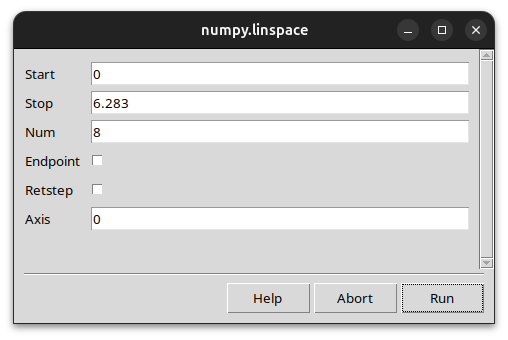
Pass --user_interface=tk or --user_interface=qt to open a graphical
dialog pre-populated with all parameters and their current values.
$ python train.py --user_interface=tk
Jupyter widget backend is also available when ipywidgets is installed:
# In a Jupyter notebook — detected automatically
p, _ = fargv.parse({"lr": 0.01, "epochs": 10})
# renders an ipywidgets form inline
Disable: pass
auto_define_user_interface=Falsetofargv.parse(...). Require specific backend:ui="tk"orui="qt"infargv.parse(...).
Zero-script CLI (python -m fargv)
Invoke any importable Python callable directly from the shell — no wrapper script needed. fargv introspects the function signature and builds the CLI on the fly.
$ python -m fargv numpy.linspace --start=0 --stop=6.283 --num=8
[0.         0.8975979  1.7951958  2.6927937  3.5903916  4.4879895
 5.3855874  6.2831853]

$ python -m fargv numpy.linspace --help
Help for linspace

  --start, -s <float>    [default: REQUIRED]
  --stop, -S <float>     [default: REQUIRED]
  --num, -n <int>        [default: 50]
  --endpoint, -e <bool>  [default: True]
  ...
Works with any importable callable: your own modules, stdlib, or third-party libraries.
parse_and_launch
A single call that parses CLI arguments and immediately invokes the target
function with them. Equivalent to p, _ = fargv.parse(fn); fn(**vars(p)).
import fargv

def train(lr: float = 0.01, epochs: int = 10, amp: bool = False):
    print(f"training  lr={lr}  epochs={epochs}  amp={amp}")

fargv.parse_and_launch(train)
$ python train.py --lr=0.001 --amp
training  lr=0.001  epochs=10  amp=True
parse_here()
Called from inside a function, parse_here() resolves the calling
function’s own signature without passing it explicitly.
import fargv

def train(lr: float = 0.01, epochs: int = 10):
    p, _ = fargv.parse_here()   # resolves train's own signature
    print(f"lr={p.lr}  epochs={p.epochs}")

train()
$ python train.py --lr=0.001
lr=0.001  epochs=10
Works inside regular functions, instance methods, and class methods.
Variadic parameters
An empty list default (or FargvVariadic) collects all unmatched CLI
tokens into an ordered list — useful for file arguments and batch inputs.
import fargv

p, _ = fargv.parse({
    "model":  "resnet50",
    "images": [],           # variadic — catches leftover tokens
})
$ python infer.py --model=vit a.jpg b.jpg c.jpg
model=vit  images=['a.jpg', 'b.jpg', 'c.jpg']
With a description:
{"checkpoints": fargv.FargvVariadic(default=[], description="checkpoint files")}
Only one variadic parameter per parser is supported.
Rich path / file types
fargv provides path parameters that validate existence or parent-directory availability at parse time, before your code runs.
Class |
Validation |
|---|---|
|
returns |
|
file must exist |
|
path must not exist |
|
parent directory must exist |
import fargv

p, _ = fargv.parse({
    "weights": fargv.FargvExistingFile(fargv.REQUIRED,
                   description="model checkpoint (must exist)"),
    "output":  fargv.FargvFile("/tmp/result.pt",
                   description="output path (parent dir must exist)"),
})
Help for infer

  --weights, -w <Path>  [default: REQUIRED]  (must exist)
  --output, -o <Path>   [default: '/tmp/result.pt']  (parent dir must exist)

$ python infer.py --weights=missing.pt
Error: File 'missing.pt' does not exist
Comparison with other frameworks
Features that are rare or absent in mainstream argument parsers. ✅ = supported natively · ⚠️ = partial / plugin required · ❌ = not supported
Feature |
||||||||
|---|---|---|---|---|---|---|---|---|
Type inference from Python literals |
✅ |
❌ |
❌ |
❌ |
✅ |
❌ |
❌ |
❌ |
Four definition styles |
✅ |
❌ |
❌ |
❌ |
❌ |
❌ |
❌ |
❌ |
|
✅ |
❌ |
❌ |
❌ |
❌ |
✅ |
❌ |
❌ |
Mandatory params |
✅ |
✅ |
✅ |
✅ |
❌ |
✅ |
✅ |
✅ |
Count-switch ( |
✅ |
⚠️ |
✅ |
❌ |
❌ |
❌ |
❌ |
❌ |
Auto short-name aliases |
✅ |
❌ |
❌ |
❌ |
❌ |
❌ |
❌ |
❌ |
Config file (built-in) |
✅ |
❌ |
⚠️ |
⚠️ |
❌ |
✅ |
❌ |
❌ |
Env-var overrides (built-in) |
✅ |
❌ |
✅ |
✅ |
❌ |
✅ |
❌ |
❌ |
Subcommands |
✅ |
✅ |
✅ |
✅ |
✅ |
✅ |
✅ |
✅ |
Bash autocomplete (built-in) |
✅ |
❌ |
✅ |
✅ |
❌ |
❌ |
❌ |
❌ |
GUI backends |
✅ |
❌ |
❌ |
❌ |
❌ |
❌ |
❌ |
❌ |
Zero-script CLI ( |
✅ |
❌ |
❌ |
❌ |
✅ |
❌ |
❌ |
❌ |
Parse + launch one-liner |
✅ |
❌ |
✅ |
✅ |
✅ |
❌ |
❌ |
❌ |
Self-resolving |
✅ |
❌ |
❌ |
❌ |
❌ |
❌ |
❌ |
❌ |
Positional parameter list |
✅ |
✅ |
✅ |
✅ |
✅ |
✅ |
✅ |
✅ |
Path / file validation (built-in) |
✅ |
⚠️ |
✅ |
✅ |
❌ |
❌ |
❌ |
❌ |